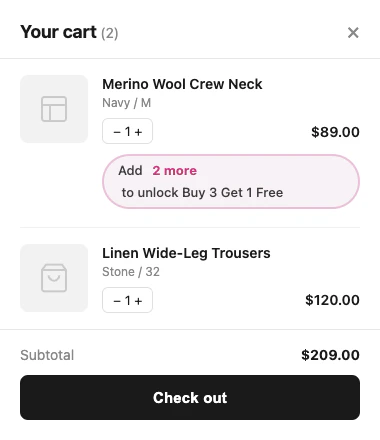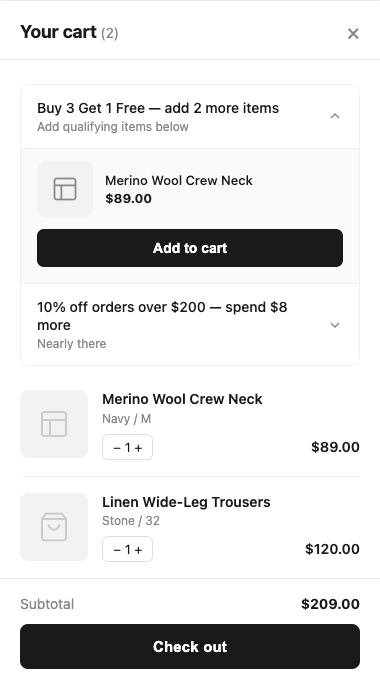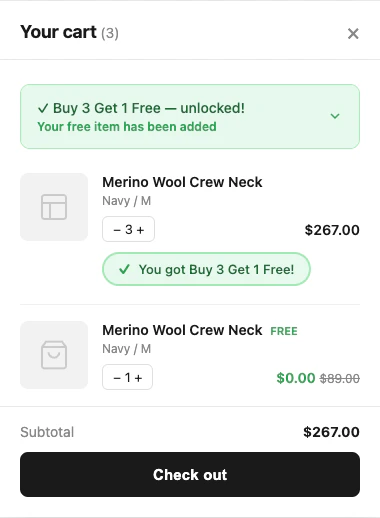

Atom Commerce helps you maximize your store’s revenue by automatically showing customers what they need to do to unlock your best promotions. Our Discount Upsell system detects when a shopper is close to qualifying for a discount and displays a friendly, actionable message—right in the cart or as a store banner.

What Are Discount Upsells?

Discount Upsells are smart notifications that:
  • Tell shoppers how close they are to a reward (like a discount or free shipping)
  • Suggest exactly what to add or spend to qualify
  • Highlight relevant products to help them reach the goal
This turns missed opportunities into extra sales, and helps your customers feel rewarded for buying more.

Use This When

You want to show spend-to-qualify or add-one-more messages for product discounts, order discounts, or free shipping

Related Setup

Review Fulfillment Type Exclusions and Checkout Extension Setup if your shipping offers depend on fulfillment rules

How It Works

Every promotion you create in Atom Commerce can be configured to show upsell messages when a customer is close to qualifying. These messages are tailored to the type of promotion:

1. Product Discounts (Buy X, Get Y, Volume, etc.)

When a shopper is just short of a product-based deal, they’ll see a message like:
Add 1 more to save USD X!
Example:
  • Promotion: “Buy 3, get 1 free” on light bulbs
  • Cart: Customer has 2 boxes
  • Upsell: “Buy one more box of light bulbs and get the next one free!”
If the promotion targets specific products or brands, the upsell can highlight those items (e.g., “Add 1 more Brand X windbreaker to save 20%!”).

2. Order Discounts (Spend Thresholds)

For order-wide discounts, Atom Commerce will show:
Spend USD 25 more to get 10% off your order
Example:
  • Promotion: “10% off orders over USD 100”
  • Cart: USD 75 subtotal
  • Upsell: “Spend USD 25 more to qualify for 10% off your order!”

3. Shipping Upsells (Free Shipping Bars)

For free shipping promotions, you can display a dynamic bar or message:
Spend USD 100 more for FREE DELIVERY
Example:
  • Promotion: “Free shipping on orders over USD 2500”
  • Cart: USD 2400 subtotal
  • Upsell: “Spend another USD 100 to qualify for free shipping. Check out our Brand X windbreakers!”
You can even suggest specific products that would help the customer reach the threshold.

Free Shipping Banners with Exclusions

When a free shipping offer includes exclusions, the banner should be interpreted against the eligible portion of the cart, not just the visible cart total. That means:
  • excluded products may not count toward the amount needed to unlock free shipping
  • excluded fulfillment methods can prevent the free shipping offer from applying even when the spend threshold appears to be met
  • the “remaining spend” message should reflect what is still needed in eligible products for an allowed fulfillment method

Merchant Example

Offer setup:
  • Free shipping over USD 100
  • Gift cards excluded from qualification
  • Pickup in Store excluded
Customer cart:
  • USD 40 t-shirt
  • USD 50 hoodie
  • USD 30 gift card
Banner behavior:
  • visible cart total = USD 120
  • eligible subtotal for free shipping = USD 90
  • banner should still show the customer is USD 10 away from free shipping
Qualification outcome:
  • if the shopper adds USD 10 of eligible merchandise and selects standard shipping, the offer qualifies
  • if the shopper chooses Pickup in Store, the free shipping discount still does not apply because that fulfillment method is excluded

How It Behaves

  • free shipping upsells should guide shoppers based on the qualifying subtotal
  • excluded items can change the banner target even when cart total looks high enough
  • excluded fulfillment methods can block the discount after the shopper has otherwise qualified

Common Pitfall

Merchants often assume the free shipping bar is based on the entire cart subtotal. If your offer excludes products or fulfillment methods, the relevant threshold is the eligible cart value for that shipping offer, not the raw cart total.

Why Use Discount Upsells?

  • Increase Average Order Value: Shoppers are more likely to add items when they see a clear, achievable reward.
  • Reduce Cart Abandonment: Customers know exactly what’s needed to unlock a deal, so they’re less likely to leave.
  • Personalized Experience: Upsell messages are tailored to each shopper’s cart and your active promotions.
  • No Coding Required: All logic is handled by Atom Commerce—just configure your promotions and enable upsells.

How to Enable Upsells

  1. Create or Edit a Promotion in Atom Commerce.
  2. Enable Discount Upsells (closeness qualifiers) for that promotion.
  3. Customize Your Message (optional):
    • Use default messages, or
    • Add your own text and product suggestions
  4. Publish and Go Live!
Atom Commerce will automatically detect when a customer is close to qualifying and show the right upsell message at the right time.

Real-World Examples

  • Buy X Get Y: “Add 1 more box of gloves to get the next one free!”
  • Order Discount: “Spend USD 50 more to unlock 20% off your order.”
  • Free Shipping: “Spend USD 100 more for free delivery. See our USD 100+ jackets!”

Frequently Asked Questions

Q: Which products are suggested in the upsell? A: If the shopper has not yet qualified for your offer, the products you chose as your condition will be suggested. For example, in a “Buy 2, get the 3rd item free” offer, if the shopper already has two items, the upsell product will be the third item. However, if your discount is different—such as “Buy 2 pairs of shorts, get 50% off a belt”—then when 2 pairs of shorts are already in the cart, the belt will be the suggested upsell. Q: Will customers see multiple upsell messages? A: If a customer is close to qualifying for more than one promotion, Atom Commerce will prioritize and show the most relevant upsell(s) based on your settings. Q: Is this compatible with Shopify’s checkout and cart? A: Yes, Atom Commerce is designed for seamless integration with Shopify stores. Q: Why did the free shipping banner move even though the cart total stayed high? A: One or more items in the cart may be excluded from free shipping qualification, so the eligible subtotal changed even though the visible cart total did not.

Get Started

Discount Upsells are available for all Atom Commerce merchants. To start using them, just enable upsells on your next promotion and watch your average order value grow! For more details, see our Offers Setup Guide.